This guide was made by AI
Wallet credit, top-ups and renewals
Open Wallet for spendable credit. Top up an allowed amount, spend it on eligible purchases, or use wallet auto-renew where that option is enabled.

On this page
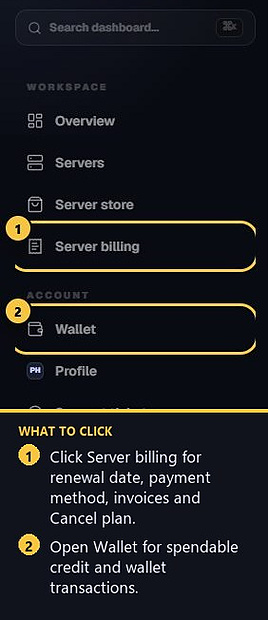
Wallet credit is spendable balance on your signed-in account. Server billing is separate: that page is for renewal date, payment method and cancel.
1. Open Wallet
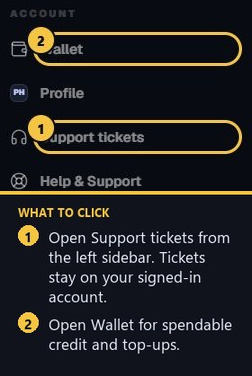
In the left sidebar, click Wallet. The page shows available balance, currency, minimum top-up and Wallet transactions. Transactions are split into pages so older activity stays easy to browse.
2. What wallet credit can pay for
Wallet credit can be used for eligible purchases and optional wallet-based server renewals where that option is enabled. It does not replace the invoices under Billing → Invoices. If support offers a ticket credit and you choose wallet, it is added here as spendable funds.
3. Top up
Enter an allowed top-up amount, optionally apply a top-up coupon, then pay with Stripe or PayPal when those methods are available. The balance updates after the payment is confirmed. If a method is missing, that gateway is turned off for wallet top-ups.
4. Wallet auto-renew
On Server billing, you can choose wallet auto-renew when that option is enabled. Only one recurring method should be active at a time. If a renewal payment fails, the subscription will show that a new payment method is needed. Set up Stripe, PayPal or wallet auto-renew by the date on Server billing.
5. Ticket credits and expiry
If support adds a goodwill credit when they close a ticket, you can take it as wallet funds or as money off your next server renewal when they let you choose. If they apply it to the next bill themselves, it comes off automatically. Leftover bill credit stays for the bill after that.
Any expiry or promotional conditions depend on the specific credit or offer. Check the terms shown when the credit is issued.
- 1Open Wallet
Check balance and Wallet transactions.
- 2Top up or spend
Eligible purchases and optional wallet renewals.
- 3Keep billing separate
Cancel and invoices still live under Server billing.
Match the error, then ask if you still need help
Most console and join issues are already in the guides. Copy the ERRORS line first. Open a ticket only if the steps still fail.