This guide was made by AI
Create a MySQL database for plugins
Create a private database for a plugin from Tools. Copy the details into the plugin and keep the password private.

On this page
Plugins such as LuckPerms and CoreProtect need their own MySQL database. The panel prefixes the name with your server id. Numbered yellow markers show what to copy.
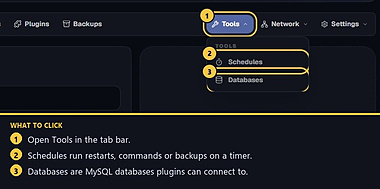
1. Open Tools → Databases
On the server page, click Tools, then Databases. Helper cannot open this page. Manager and owner can. The header shows how many slots you have, for example 1 of 2 used.
2. Create a database
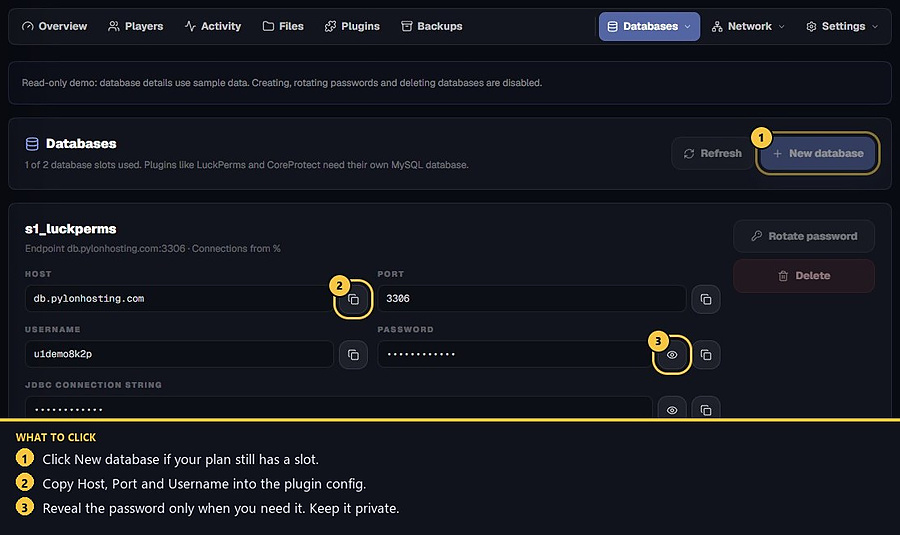
Click New database. Use a short name such as luckperms (3–48 letters, numbers or underscores). Connections from can stay as % so the plugin on this server can connect, or you can lock it to a hostname. Press Create database.
If New database is disabled, you are out of slots, the plan does not include a database, or no database host is available. Extra slots can be added on a live server for the rest of the term.
3. Copy details into the plugin
Copy Host, Port, Username and Password into the plugin config the docs name, often a MySQL or storage section. You can also copy the JDBC string. Reveal the password only while you paste it. Restart the plugin or the server after you save the config.
4. Keep credentials private
Do not paste the password into a public ticket, Discord chat or screenshot. If it may have been shared, press Rotate password, then update the plugin config. Delete removes that database and its data. Activity lists database events from the last 14 days.
- 1Open Databases
Tools → Databases.
- 2Create and copy
Name it, then copy host, port, username and password into the plugin.
- 3Rotate if leaked
Never send the password to support or a public chat.
Match the error, then ask if you still need help
Most console and join issues are already in the guides. Copy the ERRORS line first. Open a ticket only if the steps still fail.