This guide was made by AI
Invite helpers and managers
Settings → Users lets a verified PylonHosting account help with the server. They never get billing, SFTP, reinstall or user management.

Share the panel, not your login. Invite a verified PylonHosting account and pick a role. Numbered yellow markers show the buttons.
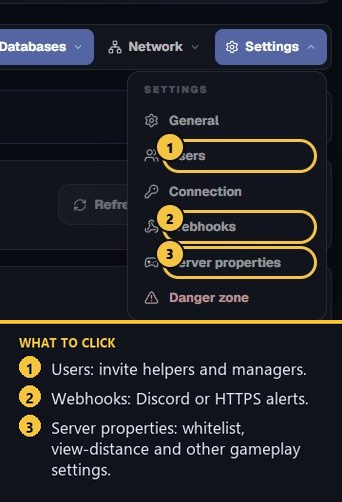
1. Open Settings → Users
On the server page, click Settings, then Users. Only the owner can invite or remove people.
2. Pick a role
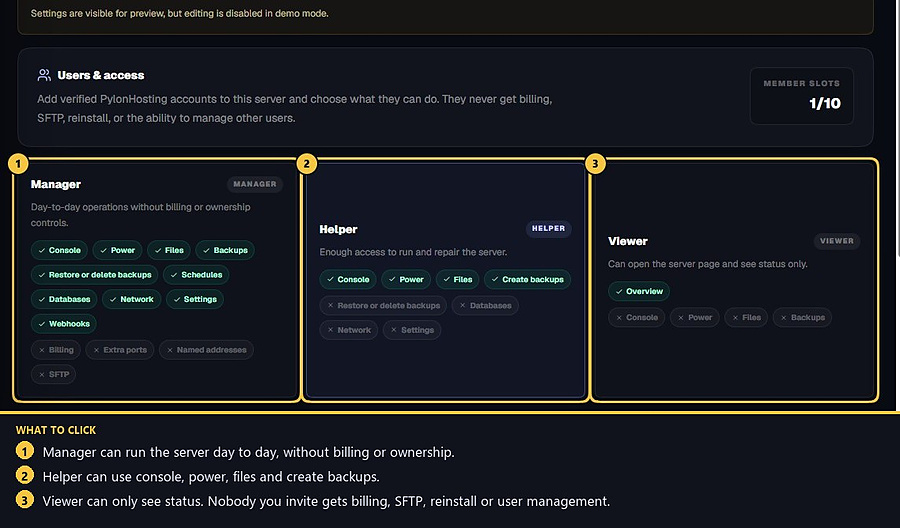
Manager can run day-to-day operations: console, power, files, backups (including restore or delete), schedules, databases, network, settings, webhooks, server software changes and modpack installs. On that manager's row you can turn software changes and modpack installs off. They still cannot use billing, extra ports, named addresses, SFTP, reinstall or user management.
Helper can use console, power, files and create backups. They cannot restore or delete backups, or open databases, network or settings.
Viewer can open the server page and see status only.
3. Add a verified account
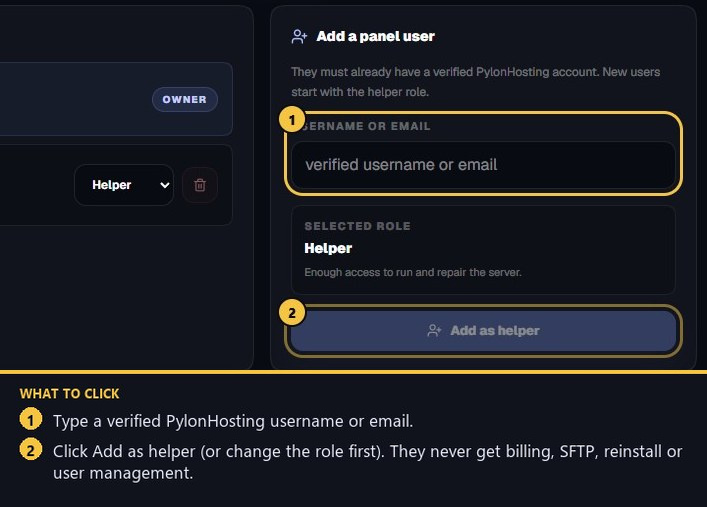
On the right, type their PylonHosting username or email. They must already have a verified account. Choose the role, then press Add as helper (the label follows the selected role).
Do not send them your website password or SFTP password. If they should no longer help, use Remove access on their row.
4. Member slots
The Users page shows how many member slots are used. Extra seats can be added on a live server for the rest of the term. Invites fail if the other person has no verified PylonHosting account yet — they need to sign up and verify email first.
- 1Open Users
Settings → Users on the server you own.
- 2Choose a role
Manager, Helper or Viewer. Managers can change software and install modpacks unless you turn that off. None of them get billing or SFTP.
- 3Add the account
Use their verified username or email, then remove access later if needed.
Match the error, then ask if you still need help
Most console and join issues are already in the guides. Copy the ERRORS line first. Open a ticket only if the steps still fail.